

Order Cancellations
Shopify, unfortunately, has a limitation in its service: a fulfillment order cannot be canceled without a cancellation_request. Therefore, to cancel a fulfillment order, it must be done through your store's Shopify Admin panel.
Shopify, unfortunately, has a limitation in its service: a fulfillment order cannot be canceled without a cancellation_request. Therefore, to cancel a fulfillment order, it must be done through your store's Shopify Admin panel.
The process of cancelling a fulfillment
When you want to cancel an order that has been pushed to eWarehousing, make sure it has the following status:
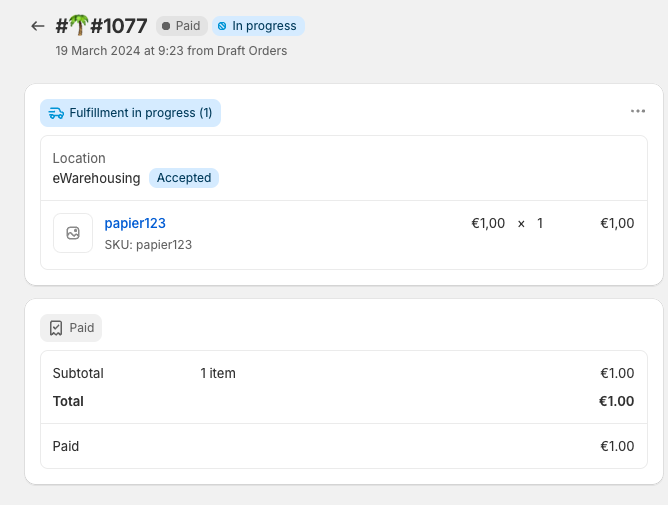
Note: The option to cancel a fulfillment order is only available if eWarehousing has accepted the fulfillment request for the order.
Next press the 3 dots in the upper right corner and select Request cancellation. A request to our app has been sent to cancel the order fulfillment in eWarehousing.
The following 2 things may happen:
Sucess
The cancellation request has been accepted by eWarehousing and the fulfillment order has been canceled in Shopify by our app.
Failure: The cancellation request has been rejected by eWarehousing and our app has rejected the request in Shopify. Possible reason is that eWarehousing already shipped the fulfillment order, thus it is not cancellable anymore.